
Skip to content
Platform features

Every capability your inspections need

Apex Reporting covers the whole reporting cycle — capture on site, AI-assisted write-up, internal review, branded delivery and long-term evidence storage.

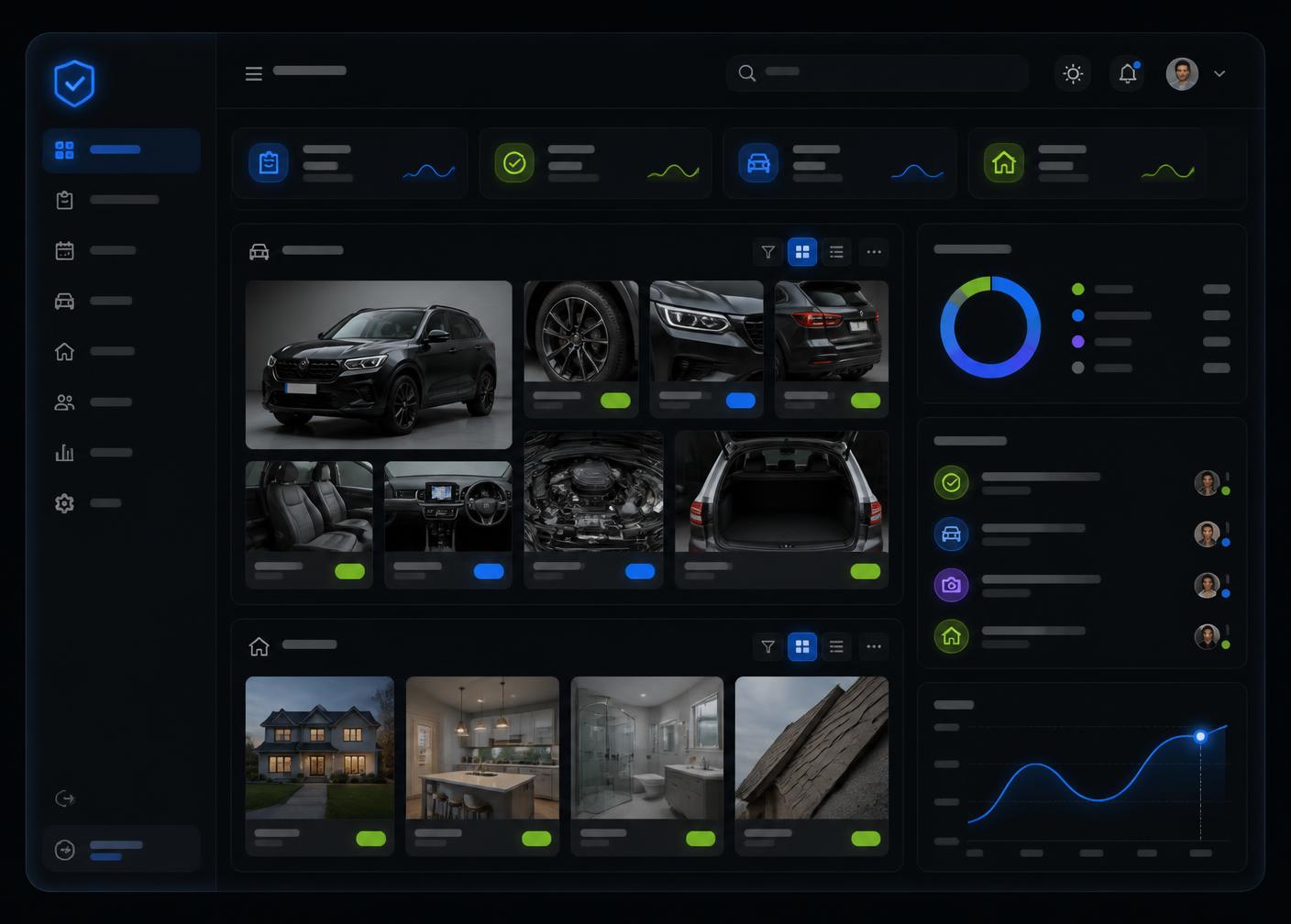
Apex Reporting dashboard with inspection photo cards, rating chips and reporting charts
In detail

What each feature does, and why it matters

Every capability below is described in terms of the practical difference it makes to a small or medium-sized business.

Capture01

Guided camera capture

What it does
An in-app camera with framing guides, required-shot prompts and instant retakes for every inspection point.
Why it matters
Most reporting problems start with missing or unusable photographs. Guided capture prevents gaps at the point they happen.
Benefit for your business
Fewer return visits, fewer disputes and a complete photographic record on the first attempt.
In practice
A rental handover checklist prompts for all four vehicle corners, the odometer, interior and any existing damage before the inspection can be completed.
Guided camera capture on a smartphone with an on-screen framing guide over a vehicle panel
Process02

Guided inspection workflows

What it does
Step-by-step inspection flows tailored to the asset type, with mandatory fields and logical ordering.
Why it matters
Consistency is impossible when every inspector works from memory or a different spreadsheet.
Benefit for your business
New starters produce work of the same standard as your most experienced inspectors.
In practice
A facilities team runs the same seven-stage property flow across every site so results are directly comparable month to month.
AI03

AI-assisted condition descriptions

What it does
AI drafts clear, professional wording for observations based on your photographs, ratings and notes.
Why it matters
Writing up findings is often the slowest and least consistent part of the job.
Benefit for your business
Hours of administration reduced to minutes, with a consistent tone across the whole team.
In practice
An inspector photographs a damaged door panel, taps a rating, and receives suggested wording ready to review and refine.
Reporting04

Condition ratings

What it does
Standardised rating scales applied to each component, area or item within a report.
Why it matters
Descriptive text alone makes it hard for clients to compare condition over time.
Benefit for your business
Clients can see at a glance what is acceptable, what needs monitoring and what needs action.
In practice
An equipment hire firm tracks the rating history of each machine to plan servicing and justify wear-and-tear charges.
Evidence05

Image annotation

What it does
Mark up photographs with arrows, circles, labels and callouts directly in the app.
Why it matters
A photograph without context can be interpreted in several different ways.
Benefit for your business
Evidence that speaks for itself, reducing back-and-forth with clients and insurers.
In practice
A restoration contractor circles a water stain and labels it so the client understands exactly what is being referenced.
Photograph of vehicle paint damage marked with a lime annotation circle
Process06

Report templates

What it does
Reusable templates for each inspection type, with your own sections, fields and rating scales.
Why it matters
Rebuilding the same report structure for every job wastes time and invites errors.
Benefit for your business
Repeatable output that reflects how your business actually works.
In practice
A property manager keeps separate templates for check-in, mid-term and check-out inspections.
Brand07

Custom report branding

What it does
Apply your logo, colours, contact details and cover styling to every report you issue.
Why it matters
Reports are a client-facing product and they represent your business.
Benefit for your business
Documents that look professionally produced rather than improvised.
In practice
A maintenance company sends branded reports that match its quotes and invoices.
Reporting08

PDF generation and export

What it does
Generate a formatted PDF with photographs, ratings, observations and sign-off in one action.
Why it matters
Clients need a document they can file, forward and refer back to.
Benefit for your business
No manual document assembly, and consistent formatting every time.
In practice
An inspector completes a report on site and emails the finished PDF before leaving the car park.
Trust09

Secure cloud storage

What it does
Reports and images stored in the cloud with access controlled by your account permissions.
Why it matters
Photographs on personal phones are easily lost and hard to retrieve when they matter.
Benefit for your business
A dependable central record that survives staff changes and lost devices.
In practice
A claim is queried nine months later and the original evidence is retrieved in seconds.
Teams10

Team accounts and permissions

What it does
Invite colleagues, group them into teams and control what each role can see, edit and publish.
Why it matters
Growing teams need shared visibility without giving everyone full control.
Benefit for your business
Scalable reporting with clear accountability.
In practice
Field inspectors submit drafts while supervisors hold approval and publishing rights.
Teams11

Review and approval workflows

What it does
Route reports for internal review before they reach the client, with comments and status tracking.
Why it matters
One inaccurate report can undo a great deal of goodwill.
Benefit for your business
A quality gate that protects your reputation as volumes grow.
In practice
A supervisor requests a clearer photograph, the inspector uploads it, and the report is then approved.
Trust12

Report search, history and audit trail

What it does
Search past reports by client, asset, date or status and view a record of changes and versions.
Why it matters
Evidence is only useful if you can find it and demonstrate it was not altered quietly.
Benefit for your business
Confident answers to client and insurer questions long after the visit.
In practice
A hire company compares the condition of the same vehicle across six previous handovers.
Report management dashboard showing searchable inspection records and condition ratings
Reporting13

Client sharing

What it does
Share reports by secure link or email, with optional acknowledgement and sign-off capture.
Why it matters
Chasing documents through email attachments is slow and easy to lose track of.
Benefit for your business
A cleaner client experience and a clear record of what was sent and when.
In practice
A tenant receives a link to a check-in report and signs to confirm they have reviewed it.
Access14

Mobile and desktop access

What it does
Capture on mobile in the field, then review, refine and manage reports on a larger screen.
Why it matters
Inspections happen on site, but management and quality control happen at a desk.
Benefit for your business
One system for both halves of the job, with no re-entry of information.
In practice
An operations manager reviews the day's submissions from the office while the team is still out.
Evidence15

Photo organisation and evidence management

What it does
Photographs are grouped automatically by inspection section, asset and date.
Why it matters
Unsorted camera rolls make evidence almost impossible to use later.
Benefit for your business
Instant access to the right image without scrolling through thousands of photographs.
In practice
Every image from a single site visit sits together under that report, ready to export.
The output

A finished report, produced from the same evidence

This illustrative example shows how captured photographs, ratings and observations come together in a client-ready document.

Vehicle Condition Report

Reference APX-0247 · Example report

Approved
Client
Northbridge Hire Ltd
Inspection date
12 March
Asset
Panel van · Reg [placeholder]
Location
Depot 2, service bay
Inspector
A. Example, Field Inspector
Report type
Return handover

Condition ratings

  • Exterior bodywork82/100
  • Interior condition94/100
  • Tyres and wheels61/100
  • Lights and glass88/100

Observations

Light impact damage to the front nearside wing with paint loss and early surface corrosion. Two tyres approaching the minimum tread depth. All lights and glazing functioning correctly at the time of inspection.

Recommended actions

  • Refer wing damage for repair estimate.
  • Replace nearside tyres before next hire.

Annotated evidence

Close-up photograph of paint damage on a white vehicle panel, circled with a lime annotation
Front nearside wing — impact damage, annotated on site
Inspector photographing an empty room during a property condition inspection
Supporting context image captured during the same visit

Sign-off

A. Example

Field Inspector · Reviewed and approved before issue

Included on every plan

Fundamentals that are never an upgrade

  • Mobile capture on the device you already use
  • Photographs organised against the right report
  • Editable output — you approve everything
  • PDF export for client delivery
  • Secure cloud storage of reports and images
  • Access from mobile and desktop
Explore

See these features working on your assets

Book a walkthrough and we will run through the workflow using an inspection type your team completes every week.

No commitment required. Pricing shown across this site is a placeholder and subject to confirmation.